3.1 Understanding Licenses, Grants, and Activations
Most questions about Tangible Cloud licensing come down to three concepts that are easy to confuse: license, grant, and activation. This page explains what each one is and how they fit together.
The short version
A license is a key owned by your organization. The key carries one or more grants. Each grant gives you the right to run a specific plugin on a limited number of sites. Every site you activate the plugin on uses one of those rights.
The rest of this page unpacks that sentence, step by step, and clears up a common misconception.
A license is a key
A license is a unique key string owned by your organization. You can see it in Tangible Cloud under Licensing, where it's displayed in a masked form like 7ZAK-····-····-6TCT — you can click the copy icon to grab the full key, or reveal it on the license detail page.
A license is created when your organization buys a product. The key itself doesn't "do" anything on its own — it's just an identifier. What makes it useful is what's attached to it: grants.
A grant is an entitlement the license carries
A grant is the actual entitlement carried by a license. Each grant specifies:
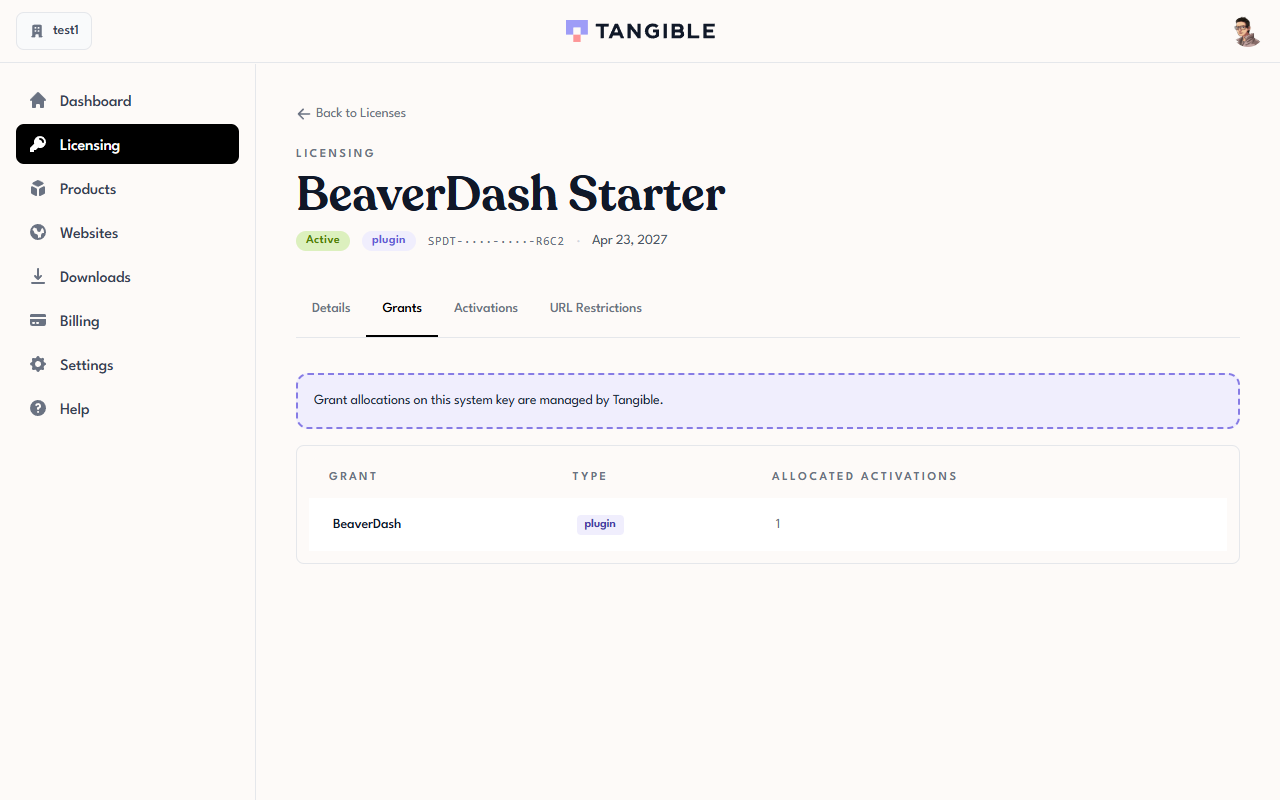
- A product (for example, Lifter Elements, BeaverDash, or MemberDash)
- An activation allowance — how many sites that grant can be used on at once
When you buy a single plugin, you get a license with one grant:
When you buy a bundle like Creators' Club, you get a license with multiple grants — one for each product in the bundle:
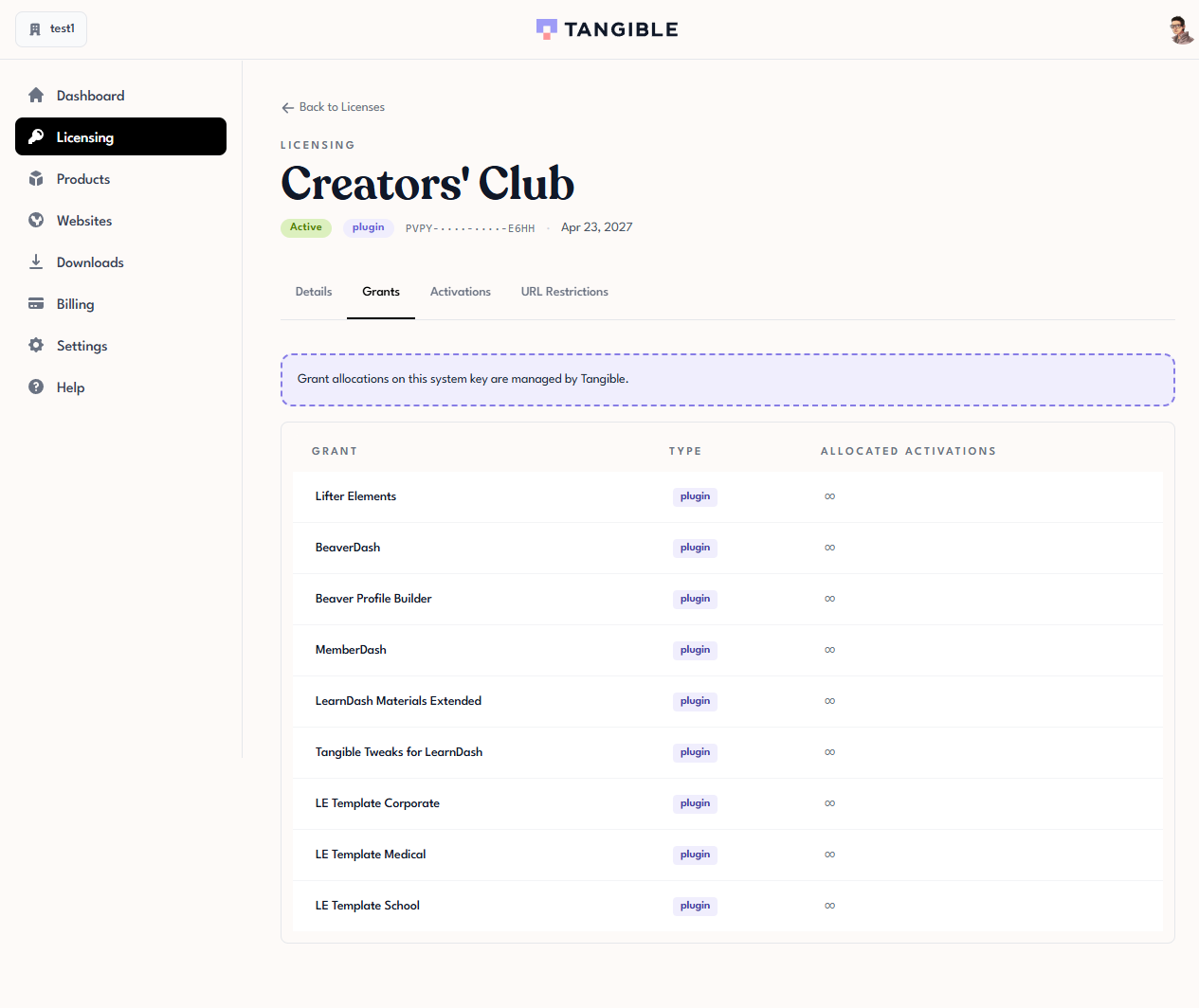
A license also has a type — plugin or bundle — shown in the Licensing list. You don't configure type directly; it's set by Tangible Cloud based on the license's origin and grants. How the type is set isn't always intuitive: a Creators' Club purchase creates a license with nine grants, but its Type is shown as plugin on staging. In general, treat Type as informational rather than a precise indicator of grant count — use the Grants tab on the license detail page to see exactly what the license covers.
An activation is a site consuming one of the grant's allowances
An activation is a specific WordPress site using one of a grant's allowances. When you enter your license key into a plugin's License tab in WordPress and click Activate, Tangible Cloud records that site as an activation against the matching grant and subtracts one from the remaining allowance.
On the license detail page in Tangible Cloud, the Activations tab lists every site currently consuming one of the license's allowances.
Why the distinction matters
Seeing the three as separate things explains behaviour that can otherwise be puzzling:
- A license can exist with zero activations. You can buy a plugin, receive the license, and never install it — the license still exists, it just has
0/1(or0/∞) activations. It isn't expired or broken; it's just unused. - One license can cover several sites through activations up to the grant limit. A Starter-tier license with an activation allowance of 1 covers exactly one site at a time. Upgrading the tier or buying an additional license increases the total activations you can have running at once.
- One license can cover several products through multiple grants. Creators' Club issues a single license whose grants cover the whole Tangible catalog — you use the same key for Lifter Elements, BeaverDash, MemberDash, and so on, and each product checks that its specific grant is present on the key.
- Deactivating a site frees an activation, but doesn't change the license or its grants. The license and its allowances persist; you just have one more slot available.
A common misconception
It's tempting to think of a license and an activation as the same thing — "I have a license for that site." But a license isn't tied to a site until you activate it. The key is issued once to your organization and persists through its full expiration period regardless of where it is (or isn't) currently being used. Every time you install the plugin on a new site, you're spending one of the grant's activation slots, not creating a new license.
Keeping that separation in mind makes the rest of the section — viewing, activating, deactivating, restricting, upgrading — straightforward.